DinoFlow is for sale by TechDino

NewDino Brain AI — 5 agents that do the work

The work app that thinks with you.

Dino Brain plans sprints, triages requests, writes reports and drafts docs.

DinoFlow is self-hosted project management software from TechDino: tasks, docs, chat, goals and sprints in one workspace. Dino Brain's agents plan sprints, triage work, write reports and draft docs alongside your team, always with your permissions.

  • 5 specialist AI agents
  • 40+ tools, your permissions
  • Self-hosted with Docker
  • Sold and supported by TechDino
  • 100% full rights and the complete codebase after purchase
Interactive exampleA scripted run on sample data. Pick a prompt to watch the agents work.

Dino Brain

Supervisor + 5 specialist agents

What should we get done?

Pick a prompt above to watch the supervisor hand work to the right specialist.

Interactive demo

Try every feature, live

Drag cards, reschedule on the timeline, write a doc, run an automation, ask Dino Brain. Real controls on sample data, right in your browser.

Loading the interactive demos

One workspace

Everything your team needs, in one place

Plan, write, talk and automate without switching tools. Every piece works with the same permissions.

Dino Brain

Five specialist agents that plan, triage, report and write, always with your permissions.

Every view you need

List, board, table, timeline, calendar, map, mind map and whiteboards, all saved per project.

Docs and sheets

Write like Word and calculate like Excel, then export to Word, PDF or Excel.

Chat and sync ups

Channels, threads and live sync ups sit next to the work they are about.

Automations

Triggers, conditions and actions, with an AI agent step when a rule needs judgment.

Dino Brain AI

An AI team, not just a chatbot.

A LangGraph supervisor hands each request to the right specialist. Every tool call goes through the DinoFlow API with your permissions, so agents never see or change more than you can.

Work & Triage agent

Finds, creates and updates work items, assigns the right people, links dependencies and triages incoming requests in bulk. The hands-on agent for day-to-day work.

Tools it can call

  • Search
  • My work
  • Create work item
  • Update work item
  • Bulk triage
  • Add comment
  • Project members
  • Project workflow
  • Add dependency
  • Whiteboards
  • Planner blocks

Try asking

  • “Triage everything unassigned in Website Relaunch”
  • “Create a bug for the broken checkout button and give it to Arjun”
  • “What is blocking WEB-24?”
Sample exchangeExample

Triage the 6 new requests in Website Relaunch.

Supervisor → Work & Triage
  • List work items
  • Project members
  • Bulk triage

Proposed: 2 High (WEB-41, WEB-43) to Maya R., 4 Medium to Arjun M., all moved to "To do". Apply these 6 changes?

  • 5

    specialist agents under one supervisor

  • 40+

    tools on the same API you use

  • Deep

    research mode: multi-step, cross-checked reports with sources

  • Always

    your permissions: agents see and change only what you can

AI everywhere

Dino Brain is built into every screen.

Write, ask, plan, generate, research and automate without switching tools. Every AI action runs with the same permissions as the person using it, on the models you choose.

Write with AI in every editor

Improve, fix grammar, change tone, shorten, expand, summarize, translate or draft from a prompt — in docs, tasks, comments and chat.

Launch updateExample

hey team, the website relaunch is kinda behind bc the design review took longer then we thought. we should probly move launch a week and maybe cut the blog migration so qa has time

Plan my day with AI

Brain proposes time blocks from your due and high-priority work, fitted into free slots. You pick which ones to add.

Today· 4 free slotsExample
Standup
Design review
1:1 · Maya R.

4 of 4 picked · from due and high-priority work

Ask Brain, wherever you are

A context-aware Ask Brain menu sits on 22 screens you already work in. Pick one to see its prompts.

Ask Brain· WEB-24 · Review onboarding flow
  • Summarize and suggest the next step
  • Break it down into subtasks
  • Triage: priority, owner, sprint
  • What could block or delay it?
Or ask anything about this task…

Forms, whiteboards and releases

Generate an intake form from one line, brainstorm and summarize a board, or draft customer or internal release notes and suggested risks.

“An intake form for design requests”Example
  • Request titleShort answer
  • TeamDropdown
  • PriorityPriority
  • Needed byDue date
  • Brief & referencesLong answer

Summarize 38 submissions → 3 themes, 4 suggested tasks

Deep research

Multi-step research that plans, searches your workspace, cross-checks findings and writes a report with sources.

Planning research questions0%

Answers from your knowledge base

Docs are chunked and embedded in Qdrant, filtered by permission, reranked and cited — so answers point back to the source.

Automations that run agents

Add “Run Dino Brain agents” to any automation rule so agents triage, assign and plan new work unattended.

Any model, full control

Bring OpenRouter, OpenAI, Anthropic or any OpenAI-compatible endpoint. Set separate models per job, with backups tried in order.

  • OpenRouter
  • OpenAI
  • Anthropic
  • Custom endpoint
Keys encrypted
Chat
Primary modelOpenRouter
Backups
2 fallbacks, tried in order
Research
Long-context modelAnthropic
Embeddings
Embedding modelOpenAI
Rerank
RerankerCustom

Read-only agents

Agents can create and update work, and ask before bulk changes.

Usage and cost, in the open

See spend from published model prices, tokens, latency and success rate per model, feature and person — plus a monthly token budget.

In the real app

Screenshots from the running product

These are screenshots of DinoFlow itself, taken on a sample project. Light and dark themes both ship.

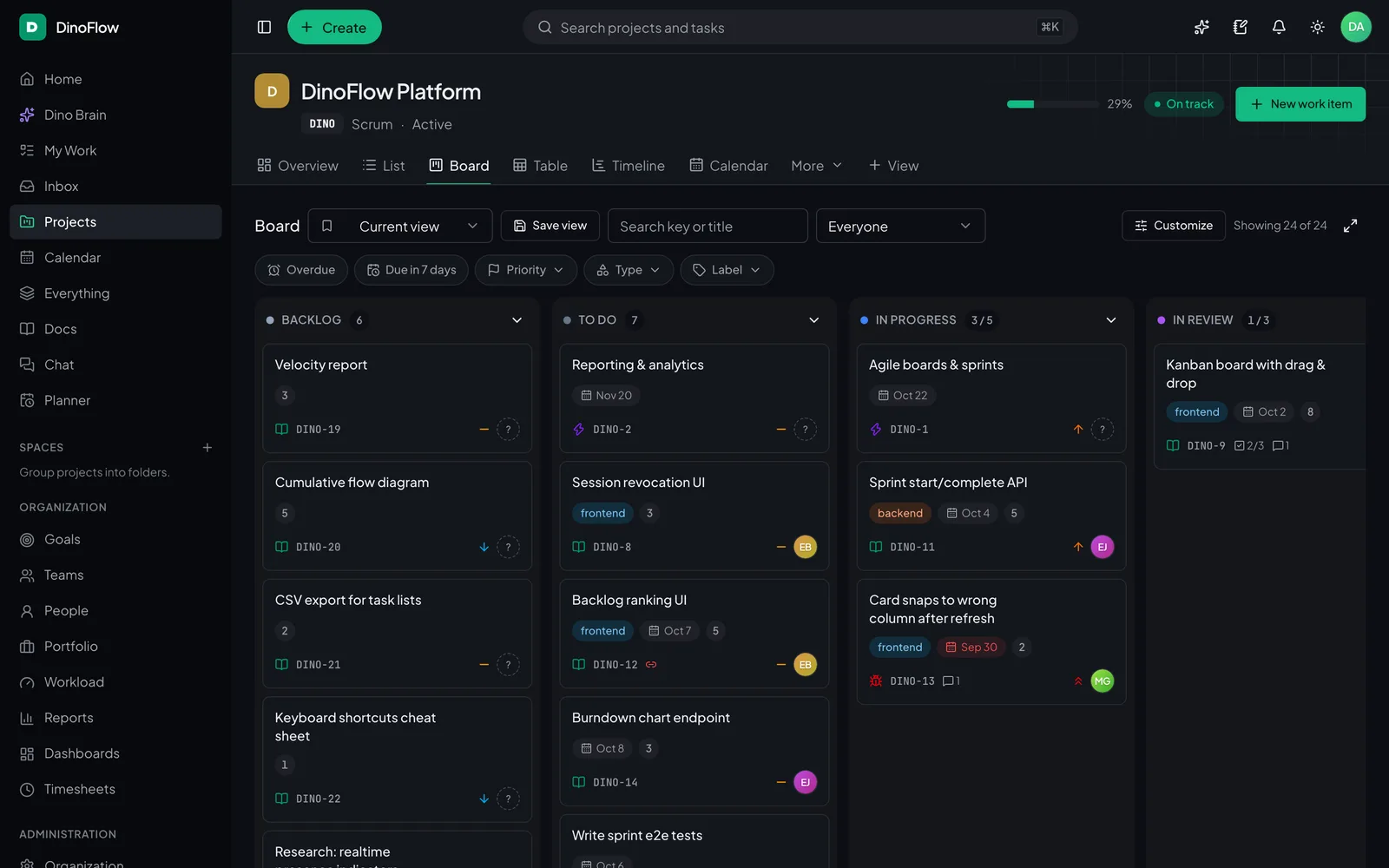
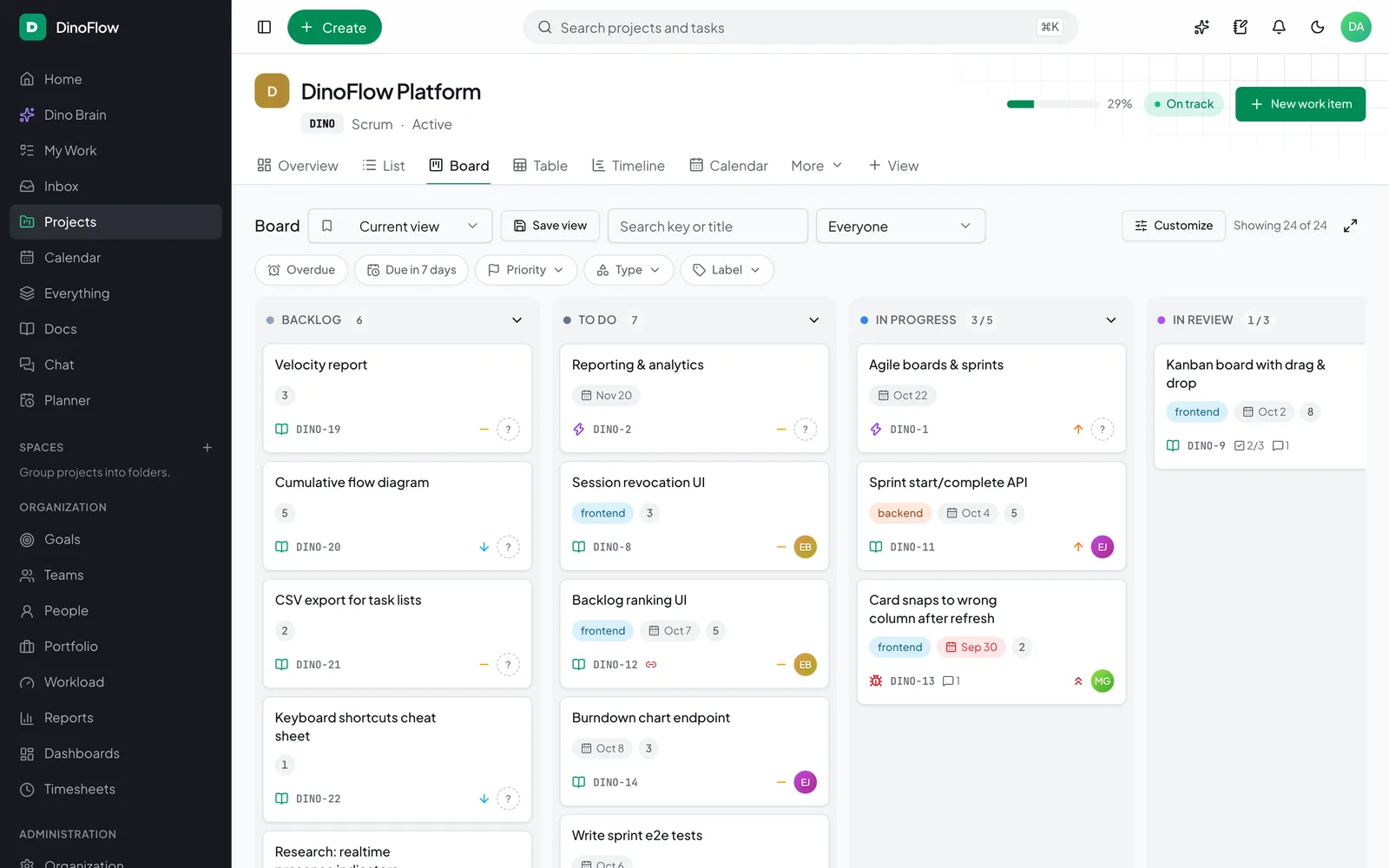
Kanban board

Drag cards between columns with WIP limits.

Try the interactive demo
DinoFlow Kanban board with Backlog, To do, In progress, In review and Done columns

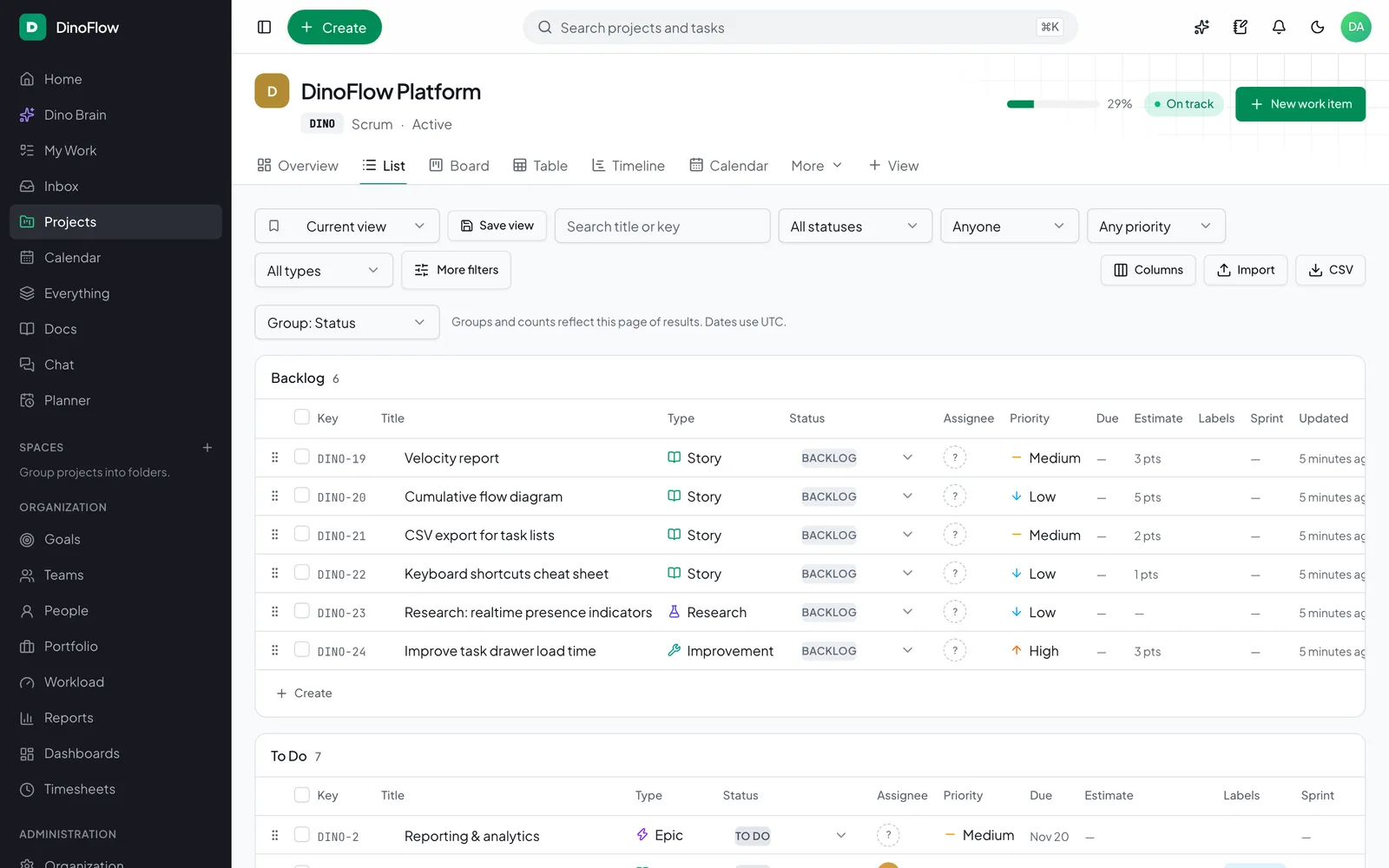
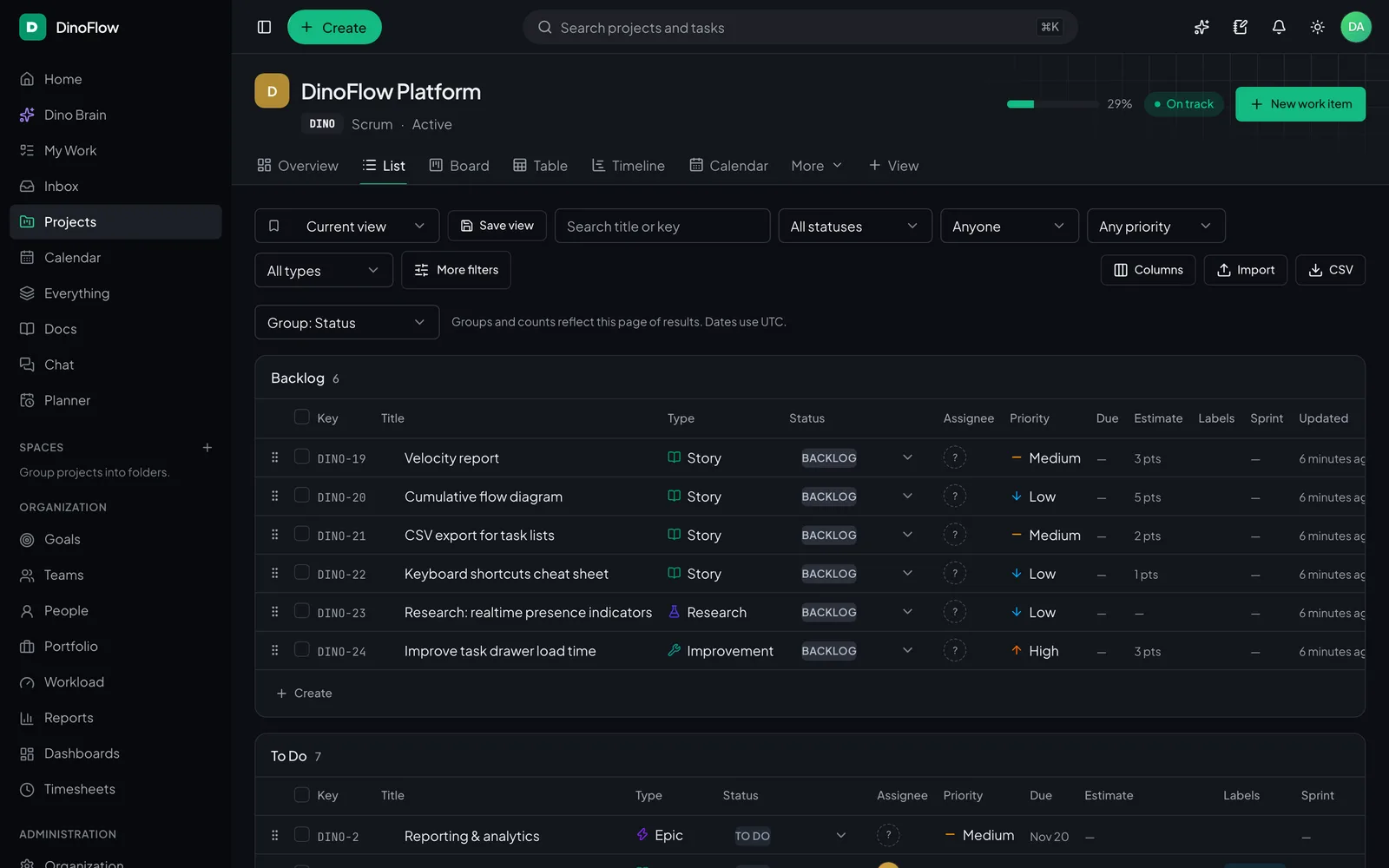
Grouped list

Group, filter, bulk edit and import.

Try the interactive demo
DinoFlow list view grouped by status with task keys, types, priorities and assignees

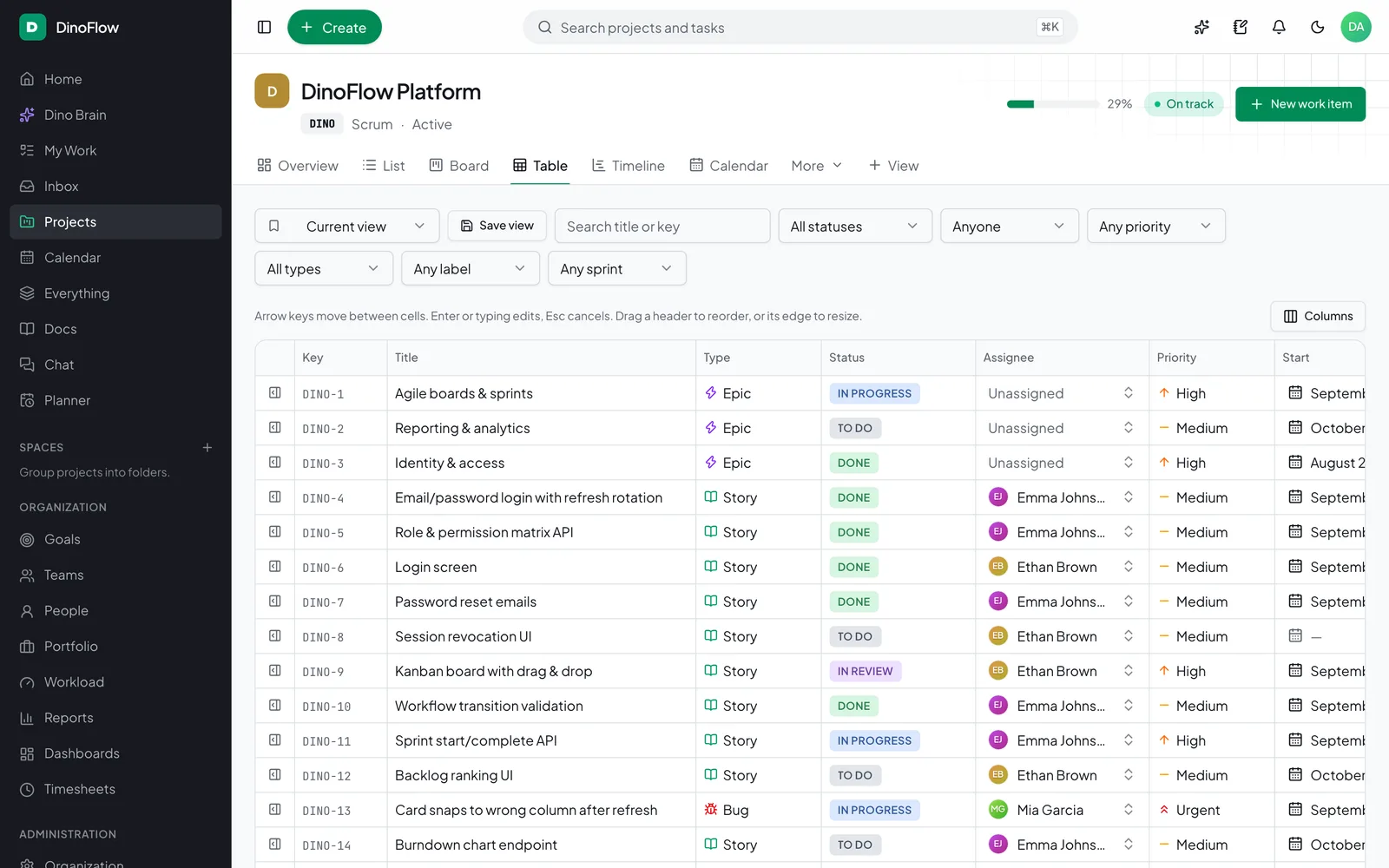
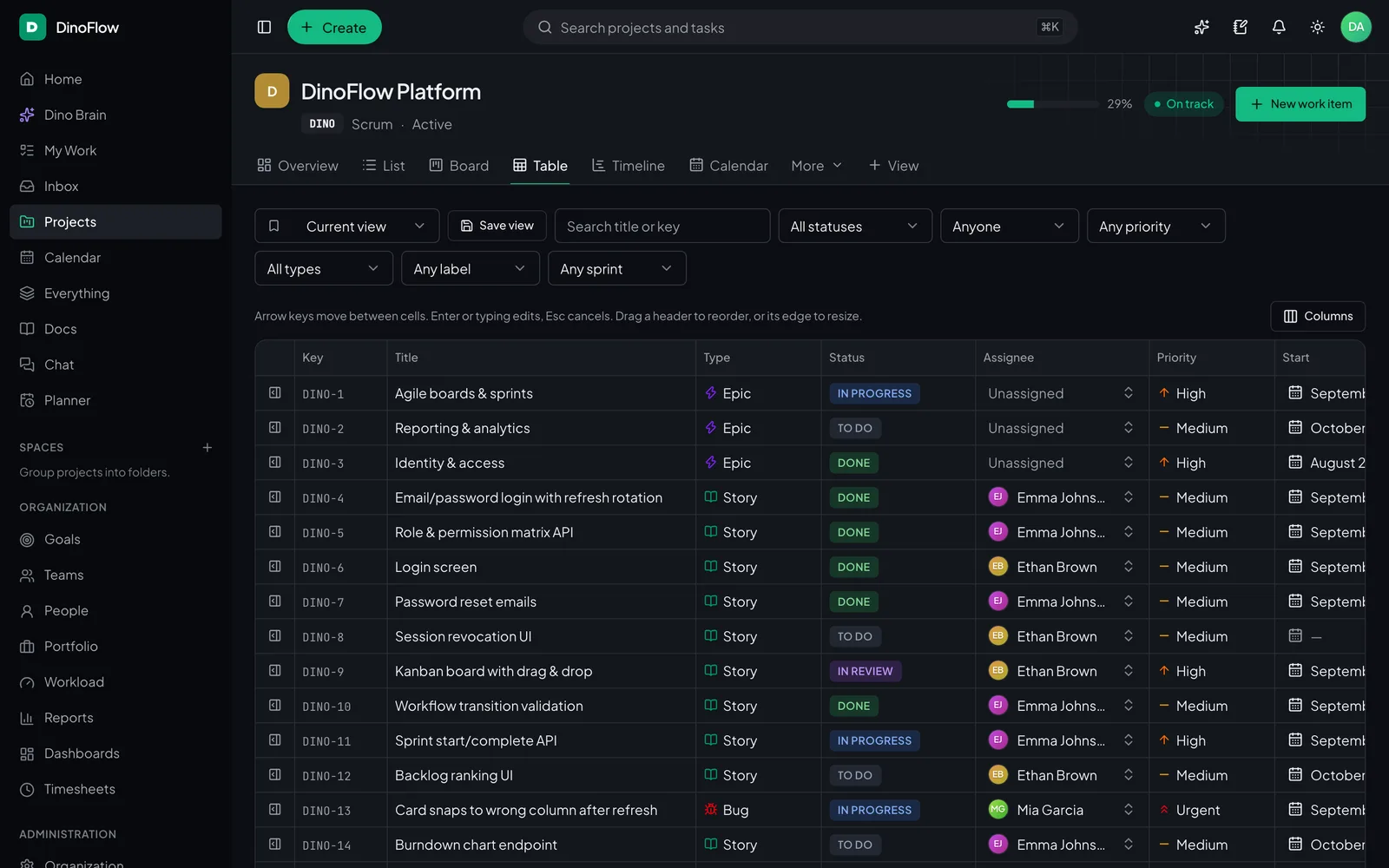
Spreadsheet-style table

Edit fields inline across every task.

Try the interactive demo
DinoFlow table view with columns for status, assignee, priority and dates

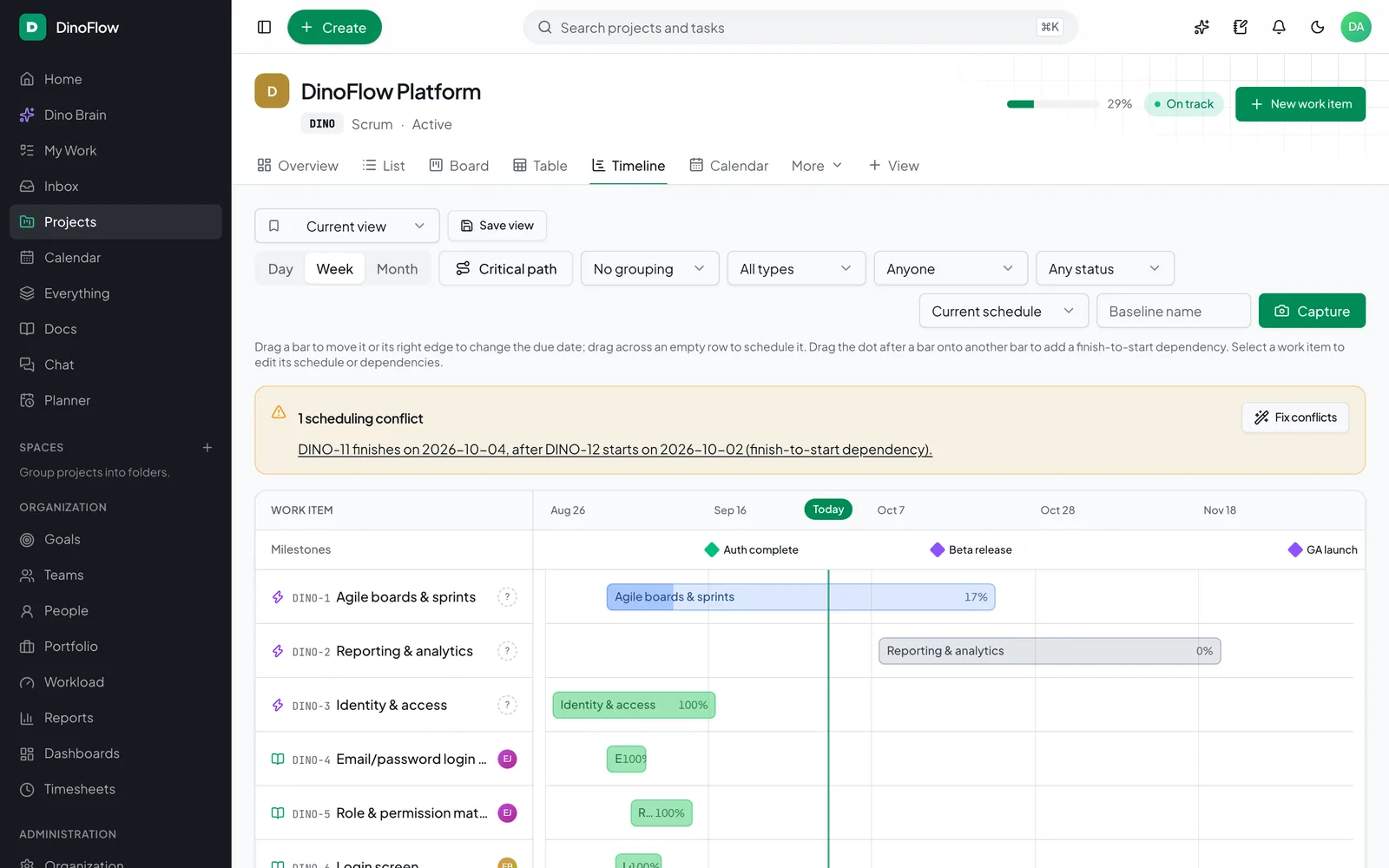
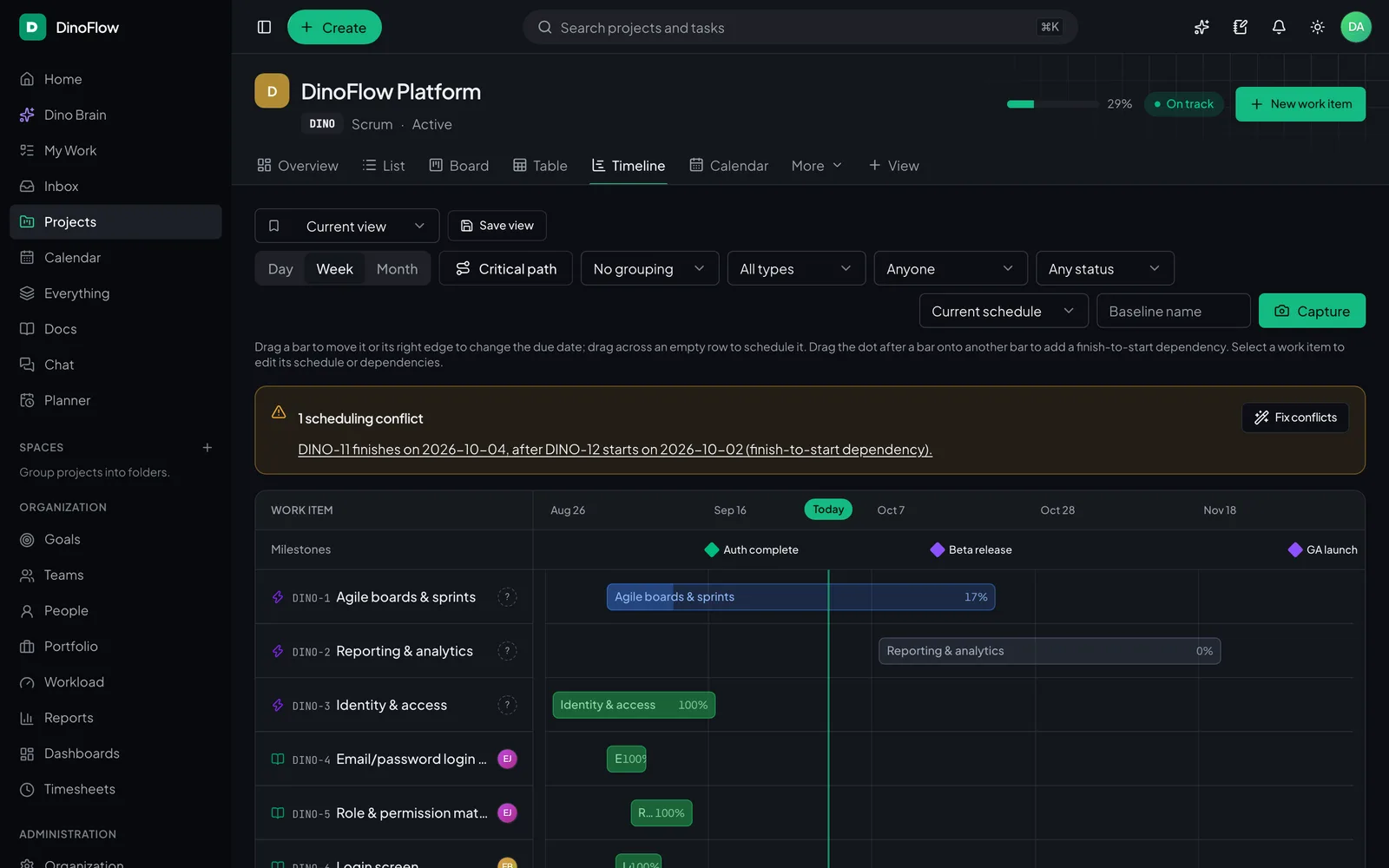
Timeline and critical path

Dependencies, baselines and conflicts.

Try the interactive demo
DinoFlow timeline with milestones, task bars, dependency arrows and a scheduling conflict banner

Automations

Rules that run the busywork, with agents on call.

Pick a trigger, narrow it with conditions and stack actions. When a step needs judgment, hand it to Dino Brain and let the agents do the reading, writing and tidying up.

  • Triggers for every moment — created, assigned, status changed, due soon, overdue, sprint started or completed, comments, approvals, plus daily and weekly schedules.
  • 10 core actions — assign people or teams, set status or priority, comment, create tasks, notify, shift dates, add labels and update custom fields.
  • AI actions built in — an AI comment, AI triage of priority, labels, type or assignee, and AI-generated subtasks.
  • Run Dino Brain agents unattended as the rule owner, with full or read-only tools and a run history for every execution.

Triage incoming bugs

ActiveOwner Maya R.Example

When

If

Priority is HighProject is Mobile App v3

Then

Assign to Arjun M.

And

Add label needs-repro

And

Run Dino Brain agents

“Look for duplicates, pull repro steps from the known-issues doc and add subtasks for the fix.”

Work & Triage agentKnowledge (RAG) agentRuns as Maya R.

Run history

No runs yet. Press Test run to watch this example rule fire.

Security & control

Fine-grained control. Your servers.

Granular access, strong sign-in and a full audit trail, with an AI layer that follows the same rules as everyone else.

Role-based permissions

Compose roles from fine-grained permissions and scope each one to a person’s own work, their team, department, project or the whole workspace.

  • Own
  • Team
  • Department
  • Project
  • All

Guests

Invite clients, contractors and partners as guests. They only see the projects they are added to, with the role you give them there.

  • Invited projects only
  • Per-project role
  • No company-wide content

SSO and two-factor

Sign in through your identity provider with OpenID Connect, and protect local accounts with authenticator-app codes.

  • OIDC single sign-on
  • TOTP two-factor
  • API tokens

Audit logs

Sensitive changes are recorded with who, what and when, so admins can answer questions without guesswork.

AI you control

Dino Brain works through the same API as the person asking. It sees and changes only what they could, never more.

  • Acts with the user’s own permissions
  • Read-only mode for agents
  • Provider keys encrypted at rest
  • Monthly token budget & usage dashboard
  • Asks before any bulk change

Self-hosted with Docker

Run the whole stack on your own servers. Your work data stays in your database, on your network.

Works with

  • OpenRouter
  • OpenAI
  • Anthropic
  • GitHub
  • GitLab
  • Webhooks
  • MCP
  • iCal
  • OIDC SSO

DinoFlow by the numbers

Project viewsList, Board, Table, Timeline, Calendar, Map, Mind map and Whiteboards
8
Specialist AI agentsCoordinated by a Dino Brain supervisor
5
MCP toolsFor AI clients that connect over MCP
44
LanguagesIncluding Arabic, right to left
8

FAQ

Questions, answered

The short version of how DinoFlow, Dino Brain and buying from TechDino work.

What is DinoFlow?

DinoFlow is a self-hosted work management platform made by TechDino. It brings tasks, Kanban boards, sprints, timelines, docs, chat, goals, time tracking, automations and an AI assistant called Dino Brain into one workspace that runs on your own servers.

Who makes DinoFlow?

DinoFlow is a product of TechDino (techdino.in). You can reach TechDino on +91 70936 08698, including on WhatsApp, to book a demo or ask about pricing and deployment.

How do I buy DinoFlow or get pricing?

Contact TechDino for pricing and a live demo: call or message +91 70936 08698 or visit techdino.in. TechDino can also help you deploy DinoFlow on your own servers.

What do I get when I buy DinoFlow?

You get 100% full rights to DinoFlow and the complete codebase: the web app, the API and background worker, the database migrations, the Docker Compose setup and the documentation. You run it on your own servers, change it as you need, and TechDino keeps supporting you after purchase.

Is DinoFlow self-hosted?

Yes. DinoFlow runs on your own servers with Docker Compose, alongside MySQL, Redis and the Qdrant vector database. Your work data stays in your database, and AI requests go only to the model provider you choose to connect.

What features does DinoFlow include?

DinoFlow includes tasks with subtasks and custom fields, list, board, table, timeline, calendar and map views, sprints with burndown, workflows with WIP limits, docs and sheets, chat and sync-up calls, whiteboards and mind maps, intake forms, time tracking and timesheets, workload planning, goals and OKRs, dashboards, automations, search, webhooks and an API.

What is Dino Brain?

Dino Brain is DinoFlow’s built-in multi-agent AI. A supervisor routes each request to one of five specialists (Work and Triage, Planning and Sprints, Reports and Time, Knowledge, and Chat and Inbox) that use 40+ tools to find and update work, plan sprints, log time, answer from your docs with citations and summarize conversations.

Can the AI change my data without asking?

No. Dino Brain acts only with the permissions of the person asking, bulk changes wait for that person’s approval, and administrators can switch agents to read-only mode. Automation rules that run agents act as the rule’s owner.

See all 18 answers

Put Dino Brain to work.

Plan sprints, triage requests, write updates and answer questions from your docs, all inside the workspace you host. TechDino sells and supports DinoFlow, and after purchase you get 100% full rights and the complete codebase: call or message for pricing and a live demo.

A product of TechDino